
- February 18, 2026
- Rupesh Patel
Why Slow WhatsApp Replies Cost Indian SMBs ₹14Lakh a Year
A furniture store owner in Pune got a WhatsApp message at 1114 AM on a Tuesday. “Hi, I saw your sofa set on Instagram. What’s the price for the 7-seater in grey?”
The message sat unread for three hours. By 2 PM, the customer had already placed an order with a
competitor who replied in four minutes.
That sofa set was worth ₹85,000. And according to Harvard Business Review, responding within 5 minutes makes you 21x more likely to qualify the lead compared to responding in 30 minutes. Not slightly more likely — twenty-one times more likely. The gap between “fast” and “slow” on WhatsApp isn’t a minor difference. It’s the difference between a business that grows and one that leaks money every single day.
This blog walks through exactly how much those slow replies cost, why your team is slow in the first place, and three fixes that actually work. If you’re running a sales or support team on WhatsApp, the numbers here will make you uncomfortable — but they’ll also show you a clear way out.
Related reading: 7 Ways to Turn WhatsApp Into Your Best Sales Channel
The Real Cost of Missed Chats
Here’s a calculation you can do with your own numbers. Grab a pen.
Your team gets a certain number of WhatsApp inquiries every week. For most SMBs we work with, it’s
somewhere between 80 and 200. Let’s use 100 as a round number.
Now, what percentage get missed or go unanswered for so long that the lead goes cold? For busy teams
running WhatsApp on personal phones, 10% is conservative. Some teams lose closer to 20%, but let’s stick with 10. That’s 10 leads per week.
Your average deal value — for an Indian SMB, let’s say ₹15,000. Your conversion rate on leads that do get a proper response — 20% is a solid average.
Here’s the math.
| Metric | Your Number |
| Weekly inquiries | 100 |
| Missed/cold responses (10%) | 10 leads |
| Average deal value | ₹15,000 |
| Conversion rate | 20% |
| Lost revenue per week | ₹30,000 |
| Lost revenue per month | ₹1,20,000 |
| Lost revenue per year | ₹14,40,000 |
₹14 lakh. That’s not revenue you’re spending — it’s revenue that never shows up because nobody replied fast enough.
And the worst part? You don’t see these leads leave. They message, wait, get no response, and quietly go somewhere else. No alert. No notification. No record that they ever existed. You can’t fix what you can’t see.
Plug your own numbers in. If your average deal is ₹25,000 or your team gets 150 inquiries a week, the
number gets much larger.
Why Your Team Is Slow
The problem isn’t effort. Your team is probably working hard. The problem is structural.
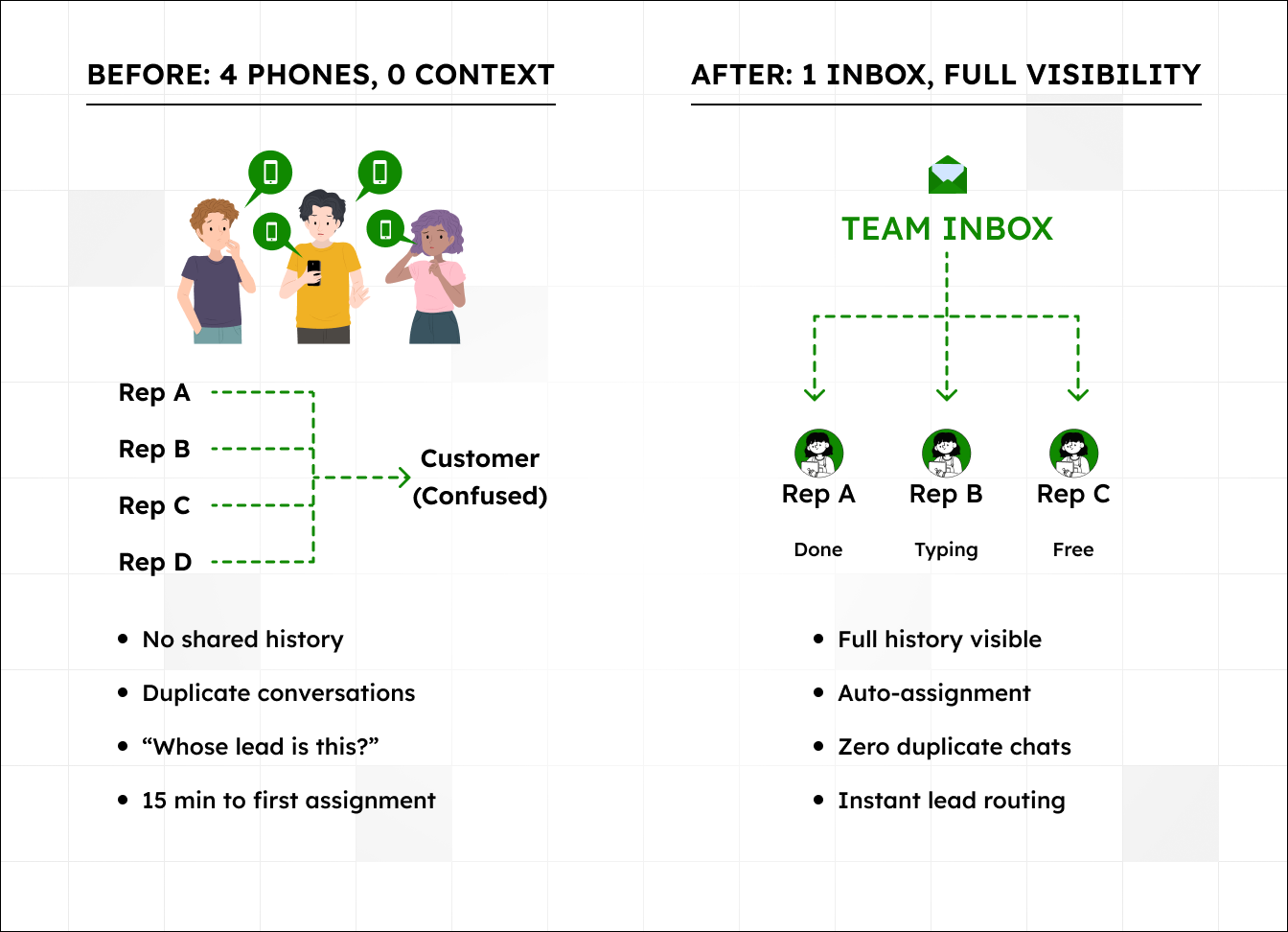
Four phones, zero context. When your sales team runs WhatsApp off personal phones — which most
Indian SMBs do — you get fragmented conversations everywhere. Customer messages Phone A. Rep A is busy, so customer finds another number and messages Phone B. Now two reps are talking to the same
person and neither knows about the other. Confusion for the customer, wasted effort for the reps, and
sometimes a lost deal because the customer got frustrated.
We see this pattern constantly. The customer thinks they’re talking to one company. Your company is
actually four separate phones with four separate conversation histories and zero overlap.
Manual lead assignment eats 15 minutes. A new lead comes in. Three reps see the notification. All three assume someone else will handle it. Fifteen minutes pass before anyone responds — and by then, the lead has already messaged your competitor. Classic bystander effect, but for sales. Even when someone does pick it up, there’s the back-and-forth of “whose lead is this?” that burns another 10 minutes.
The fix isn’t “communicate better.” The fix is removing the situations where communication gaps happen.
Three Fixes That Work
Fix 1: One Inbox, Everyone Sees Everything
A team inbox puts every WhatsApp conversation in a single view. When a customer messages, the whole
team sees it. Whoever’s free picks it up. Full history visible. No duplicate conversations, because the
system shows who’s already handling what.
But the real benefit is auto-assignment. Instead of the bystander effect, leads get assigned the moment
they arrive. Round-robin distributes them equally. Or you can route by location, product interest, or lead
source — whatever fits your sales process.
That 15-minute delay from “whose lead is this?” drops to zero. Setup takes 10 minutes and the benefit lasts as long as you’re in business.
Fix 2: Templates That Save 45 Minutes Per Rep Per Day
Your team types the same responses 50 times a day. “Thanks for reaching out, let me check.” “Here’s our
pricing.” “Our office hours are Monday to Saturday, 9 to 6.” Every single time, typed out manually.
Templates turn a 3-minute response into a 30-second one. Pre-write your top 10 replies, save them, send
with one click.
The trick that makes templates actually work is personalizing the first line. A bad template says “Thanks for your inquiry.” A good one says “Hi [Name], thanks for asking about [Product].” The body can be
standardized, but that first line needs to feel like a real person wrote it — because a real person did, just
faster.
Start with these five
- First response / acknowledgment
- Pricing or catalog share
- Meeting scheduler
- Follow-up reminder
- Thank you / closure
Time saved per rep per day — roughly 45 minutes. That adds up to almost 4 hours per week per rep, which your team can spend on conversations that actually need thinking.
Fix 3: Automate the Repetitive Stuff
Some messages don’t need a human at all. Welcome messages when a new lead contacts you for the first time. Acknowledgments like “Got your message, someone will reply within 10 minutes.” After-hours
responses so customers know you’re not ignoring them.
A workflow builder handles this. You set the trigger (new conversation, keyword match, time of day) and the action (send message, assign to rep, add tag). The system runs it automatically.
This doesn’t replace your sales team. It covers the gaps between human responses — the
acknowledgments, the routing, the first-touch messages — so your team can focus on the conversations
where their judgment matters.
Want to see what else automation can do? Read: From Cold Leads to Closed Deals: A WhatsApp Follow-Up System
Diagram 1: The Leaky Bucket
This shows where leads drop off at each stage — and how the numbers change with faster response times.
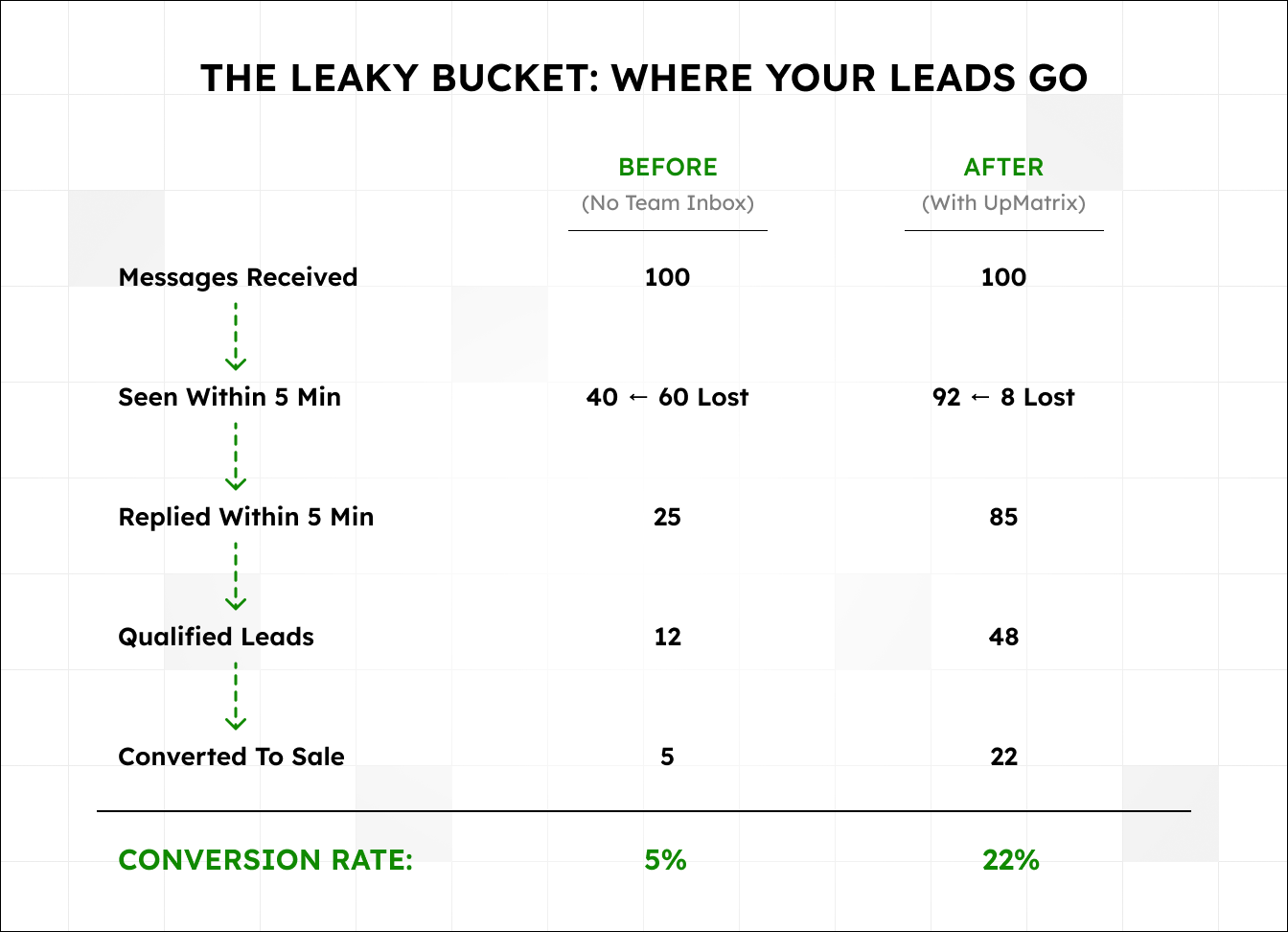
Diagram 2: Before vs After
What This Looks Like in Practice
A real estate agency in Bangalore had six sales reps, each running WhatsApp on personal phones. Their
problem wasn’t lead generation — they were getting plenty of inquiries from property portal listings. The problem was that leads were falling through the cracks, and nobody had visibility into what was happening across the team.
Week one after switching to a team inbox, all conversations came into a single view. Reps could see what everyone else was handling. No more duplicate responses, no more “I thought you had it.”
Week two, average response time dropped from 3 hours to 18 minutes. Not because the reps suddenly
worked harder, but because leads got auto-assigned the moment they came in, and templates handled the initial acknowledgment within seconds.
By week four, their lead-to-demo conversion was up 40%.
“Now I can see every conversation,” their manager Priya told us. “If someone’s stuck, I jump in. If a lead
goes cold, I know why.”
The tool didn’t make them better salespeople. It just removed the friction that was costing them deals every day. Sometimes the fix really is simpler than you think.
Run Your Own Numbers
Go back to the cost calculation in section two. Plug in your actual numbers — your weekly inquiry volume, your average deal value, your conversion rate. If the leak is even half of what we’ve described here, the annual cost is probably uncomfortable.
The three fixes above — team inbox, templates, and workflow automation — took one team from a 3-hour average response time to 18 minutes. That’s not a theoretical improvement; it’s what happens when you stop losing leads to inbox chaos.
If you want to see what your own response time metrics look like, start a free trial and connect your
WhatsApp Business number. The analytics dashboard shows your team’s real numbers within the first week — response times by rep, conversations by status, and peak hours for inquiries. Most teams are surprised by what they find.
Or if you’d rather talk it through first, book a 15-minute demo and we’ll walk through your specific setup.