
 Discuss My Process
92% of salespeople give up after the 4th follow-up. 80% of deals close after the 5th. That gap - between where most reps stop and where most deals happen - is where revenue goes to die.
An education consultancy in Hyderabad had 4,000 WhatsApp contacts. No tags, no pipeline, no follow-up system. Just names and chat histories. When they needed to re-engage leads interested in a specific course, they had no way to find them. Conversion rate sitting at 8% - not because the leads were bad, but because the follow-up system was hope.
This blog builds a complete follow-up system, layer by layer. Each section adds a component, and by the end you’ll see how contacts move from first message to closed deal. Every layer works for teams of 3-10 people running sales on WhatsApp.
Relatedreading:Why Slow WhatsApp Replies Cost Indian SMBs ₹14 Lakha Year
Layer 1: Tag Everything
That consultancy with 4,000 contacts? After implementing proper tags, finding leads interested in a specific course went from “scroll and guess” to typing three filters and getting 47 results in 10 seconds.
Tags sound basic. But most teams either skip them or create useless ones like “Important” and “Follow Up” - labels that mean nothing after a week because everything becomes important.
Tags that actually work are specific and filterable.
| Bad Tags | Good Tags |
|---|---|
| Important | Dec-2025 (purchase month) |
| Follow Up | Widget-Pro (product interest) |
| Hot Lead | Demo-Done (lead status) |
| Interested | WhatsApp-Ad (lead source) |
One e-commerce team tagged contacts by purchase month and product category. New product launch? They filtered for customers who bought the old version 6+ months ago. 340 contacts. One broadcast. 52 upgrades. Without tags, that campaign doesn’t exist.
Add conversation labels on top of contact tags. Tags describe the contact (who they are, what they bought), and labels describe the conversation (what it’s about right now). A fintech team added 4 labels - Sales, Support, Billing, General - and their response time improved 35% because the right people started seeing the right messages.
Layer 2: Automate the Follow-Ups
Lead says “I’ll think about it.” What happens next is the entire ballgame.
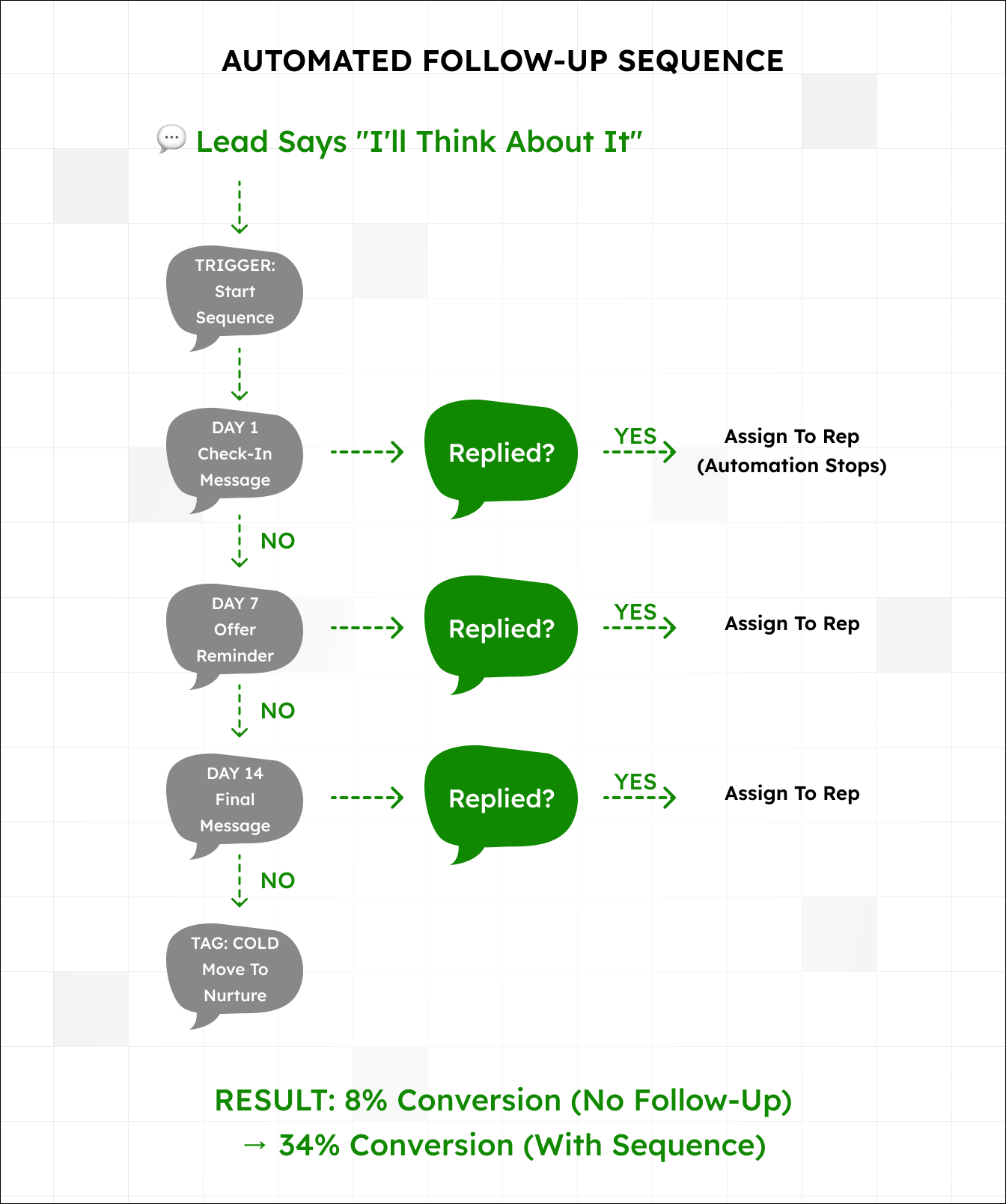
We tracked 200+ sales conversations. Leads who got a follow-up within 48 hours converted at 34%. Leads with no follow-up converted at 8%. Same leads, same reps. The only variable was whether someone showed up again.
Humans forget, especially when juggling 40 other conversations. Automated follow-ups remove the forgetting.
Here’s a sequence that works.
- Day 1 - “Hi [Name], any questions about the quote I sent?”
- Day 3 - “Just checking in. Happy to jump on a quick call if it’s helpful.”
- Day 7 - “Wanted to follow up one more time - offer is valid through Friday.”
- Day 14 - “Last note from me. Let me know if you’d like to revisit this down the line.”
The rep sets the trigger once. The system sends on schedule. When a customer replies, the automation pauses and the rep takes over.
A real estate team in Pune set up a 3-message sequence for property inquiries. Their “thinking about it” leads started converting at 2x the previous rate - just by not forgetting.
Not every lead converts, and that’s fine. By day 14, if there’s zero response, tag them “cold” and move onwith a clean pipeline.
Diagram 1: Follow-Up Sequence Flowchart
Layer 3: Saved Replies for Speed
Your team answers the same questions dozens of times a day. Pricing, business hours, product specs, delivery timelines. Each time, someone types a full response from scratch or digs through old chats to copy-paste.
Saved replies are pre-written responses that reps select, personalize with the customer’s name, and send. Same quality response, 3-4x faster on routine messages.
This is different from automation. Saved replies don’t send themselves - a human picks the right one, tweaks it, and decides when to send. The thinking still happens. The typing just gets faster.
Start with 8-10 saved replies covering your most common responses, from pricing and business hours to delivery timelines and meeting scheduling.
One support team cut average handle time by 40% after setup. Same answers, delivered in 30 seconds instead of 3 minutes. That freed up roughly 20 hours per month for conversations that actually needed thinking.
Layer 4: Manager Dashboard and Stuck Lead Alerts
“How many leads came in this week?” Your sales manager asks, and the next 45 minutes disappear. Reps get messaged. Numbers get compiled. By the time anyone has an answer, the meeting is half over.
A manager dashboard shows everything on one screen - 127 new conversations, 23 unassigned, 14- minute average first response, rep performance by volume and speed. The 45-minute meeting drops to 15 minutes.
Stuck lead alerts take this further. Set a rule so that any conversation with no response in 2 hours triggers a notification to the team lead. Instead of a lead sitting in silence for half a day, someone sees “3 conversations need attention” and jumps in.
An education consultancy set 90-minute alerts. No-response rate dropped from 12% to 3%. No new hires - they just caught problems before those problems walked out the door.
Layer 5: Visual Pipeline and Shared Notes
“Where’s the Sharma deal?” “Somewhere in the pipeline.” “What stage?” “Let me check.”
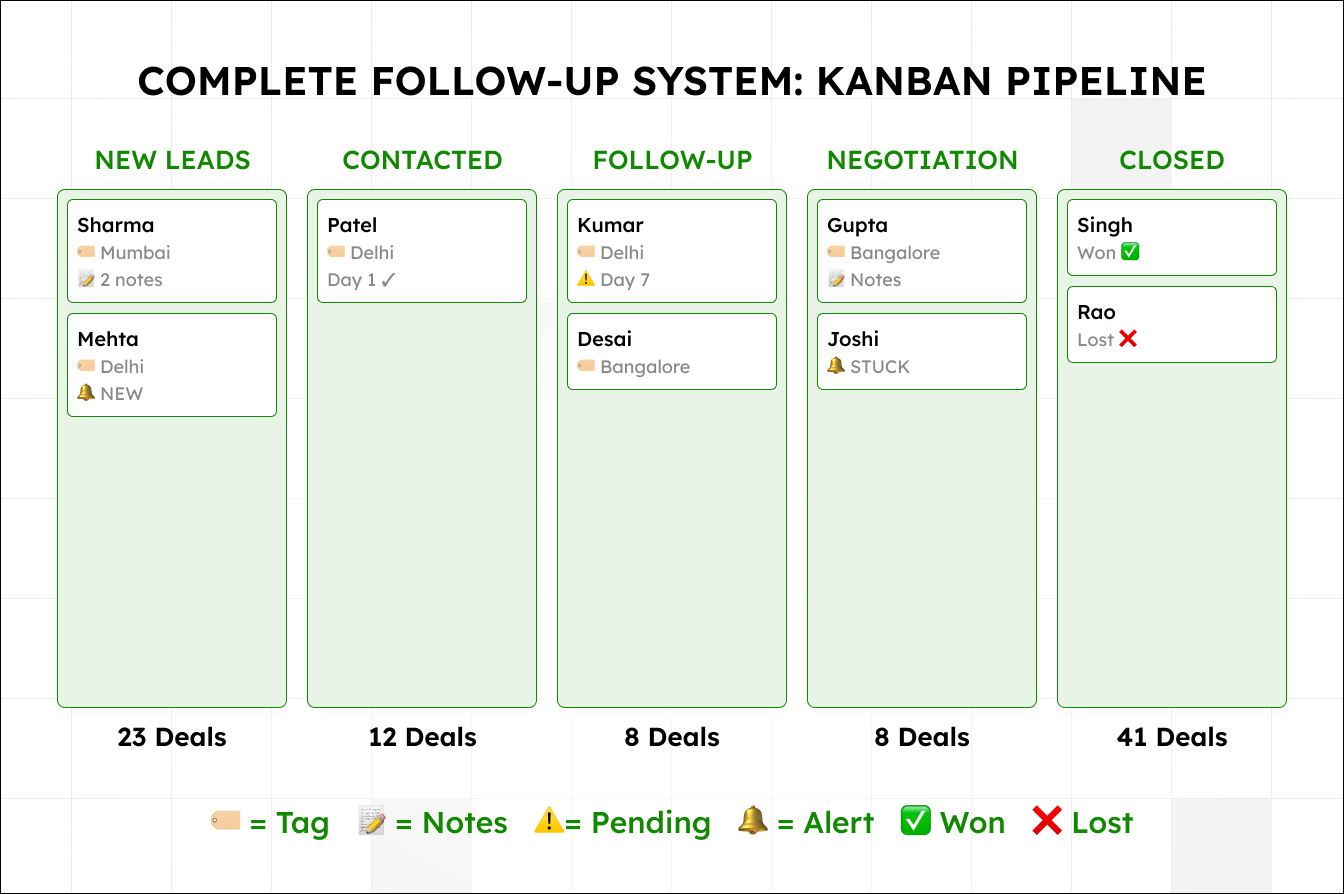
This conversation happens 50 times a week in teams running deals off spreadsheets. A Kanban pipeline replaces it entirely.
Every deal is a card. Every stage is a column. Sharma deal? It’s in Negotiation, last activity 3 days ago, needs follow-up. You see that in 5 seconds instead of asking around.
One manufacturing distributor moved from spreadsheets to Kanban and closed 23% more deals that quarter. Not better leads - deals just stopped falling through the cracks.
Shared notes make handoffs painless. Customer calls back about an order issue, and your rep has no idea what was discussed because notes live in someone else’s notebook. Shared notes log every interaction - visible to whoever picks up next.
A hospitality company made contact notes mandatory. CSAT went up 18% in one quarter because customers stopped having to repeat themselves.
Diagram 2: Complete Follow-Up System
Putting It All Together
That education consultancy from the opening? After building this system layer by layer, their conversion went from 8% to 34%. Same contacts, same reps, same products. The system changed.
| Layer | Impact |
|---|---|
| Tags + Labels | 47 results in 10 seconds vs scrolling 4,000 |
| Follow-Up Automation | 8% → 34% conversion |
| Saved Replies | 3-4x faster on routine messages |
| Dashboard + Alerts | 45 → 15 min meetings, 12% → 3% no-response |
| Pipeline + Notes | +23% deals closed, +18% CSAT |
No single layer is magic. Stacked together, they create a system where leads don’t get lost and every deal is visible.
For the first two layers of this system - fast responses and team inbox - see: Why Slow WhatsApp Replies Cost Indian SMBs ₹14 Lakh a Year
For additional upgrades including analytics, chatbots, and broadcasts: 7 Ways to Turn WhatsApp Into Your Best Sales Channel
Start Building
You probably already have the leads. The question is whether your system catches them or lets them slip through.
Start with Layer 1 (tags) and Layer 2 (automated follow-ups). Those two alone took one team from 8% to 34% conversion. Add the rest as your team gets comfortable.
Start a free trial and begin with tagging your existing contacts. Or book a demo and we’ll help you figure out which layers matter most for your sales process.